
Funny Shooter 2 Cross-Platform Guide
Imagine you are at home, sitting comfortably at your desk. You just reached a high level in a chaotic FPS game, unlocked a golden rifle, and defeated a giant boss. Suddenly, you have to leave for a long commute or a doctor's appointment. Usually, your gaming progress stays stuck on your PC. But what if you could pick up your phone and continue exactly where you left off?
Many gamers feel frustrated when they cannot sync their achievements across different devices. Most modern games require heavy downloads or expensive accounts to allow cross-play. This creates a barrier for casual players who just want to have fun. How can you enjoy a seamless gaming experience without losing your hard-earned progress?
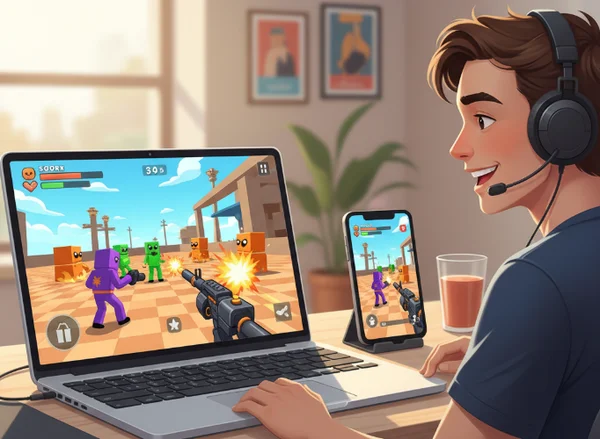
Funny Shooter 2 is the perfect answer to this problem. It is a browser-based game designed for flexibility and fun. Whether you are using a desktop, a tablet, or a smartphone, the game is always ready. In this guide, we will show you how to master the cross-platform features of this hilarious shooter. If you are ready to jump into the action, you can play the game right now in your browser.
Understanding Funny Shooter 2's Cross-Platform Capabilities
To appreciate how Funny Shooter 2 works, we need to look at the technology behind it. Unlike traditional games that require an installation, this game lives entirely on the web. This means the barriers between your PC, your Mac, and your Android or iOS device are gone.
How Browser-Based Gaming Enables Cross-Play
Funny Shooter 2 is built using HTML5 technology. In the past, online games used Flash, which did not work well on mobile phones. HTML5 changed everything. It allows complex 3D graphics and smooth gameplay to run directly in any modern web browser like Chrome, Safari, or Firefox.
Since the game runs directly in your browser, it doesn't matter what operating system you're using. Whether you play on Windows, macOS, or ChromeOS, your experience stays the same. This "platform-agnostic" design is why many students find it the perfect unblocked games choice. You don't need to ask for permission to install software. You just need an internet connection and a link.
What Cross-Platform Features Are Available
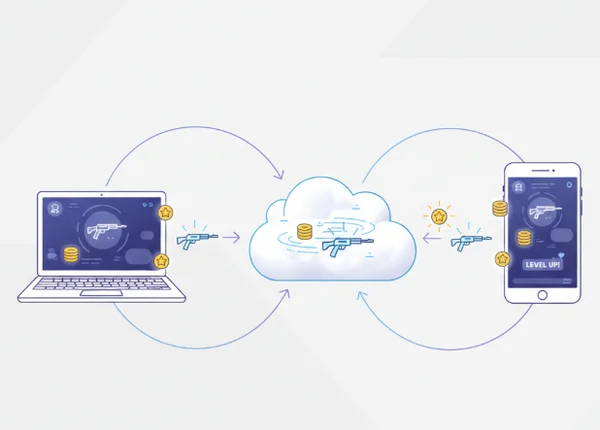
When we talk about cross-platform play in Funny Shooter 2, we mean "continuity." The game is designed to recognize you across different sessions. The most important features that carry over include your coin balance, your unlocked weapons, and your current level progress.
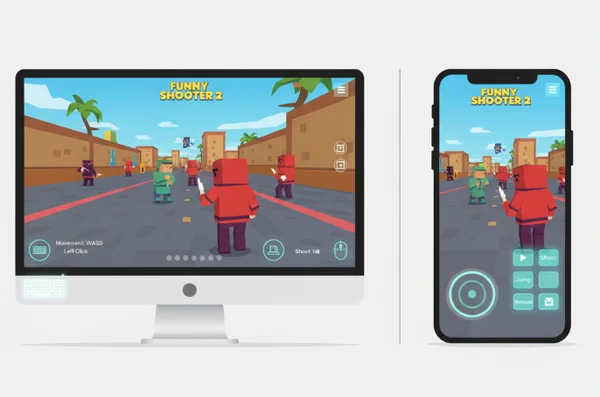
If you spend an hour grinding for coins to buy the "RPG" on your desktop, you don't want to start over on your phone. The game stores your data efficiently so your arsenal stays with you. However, keep in mind that the control scheme will change. On a PC, you use a keyboard and mouse. On mobile, you use touch gestures. While the progress stays the same, the way you interact with the world adapts to your device.
Playing Funny Shooter 2 on Desktop vs. Mobile
Each platform offers a unique way to experience the colorful world of Funny Shooter 2. While the core gameplay—shooting silly enemies and upgrading guns—remains the same, your strategy might change depending on your screen size and input method.
Desktop Experience Optimization
Playing on a desktop or laptop is the "classic" way to enjoy a first-person shooter. You have the advantage of precision. Using a mouse allows for much faster aiming and better reaction times when enemies swarm you. To get the best performance, we recommend using a Chromium-based browser like Google Chrome or Microsoft Edge.
For the best experience, always use the full-screen mode. This prevents your mouse cursor from accidentally clicking outside the game window. You should also check your mouse sensitivity in the game settings. Higher sensitivity is great for 360-degree turns, while lower sensitivity helps with long-distance headshots. If you want to test your aim, start your test on a large monitor to see every funny detail.
Mobile Experience Optimization
The mobile version of Funny Shooter 2 is all about convenience. It is perfect for quick sessions during lunch breaks or while traveling. The game automatically detects your mobile browser and adjusts the UI. You will see virtual joysticks on your screen for movement and aiming.
To keep the game running smoothly on mobile, close other background tabs in your browser. This frees up RAM and prevents lag. Also, consider your battery life. 3D games can drain a phone's battery quickly. Lowering the screen brightness can help you play longer. The mobile version is surprisingly optimized. It provides high-energy fun without taking up any storage space on your phone.
Maintaining Your Progress Across Devices
The biggest concern for any gamer is losing progress. Nobody wants to lose a rare weapon or a high score. Want to keep all your hard-earned progress safe? Knowing how Funny Shooter 2 saves your data makes for a worry-free gaming experience.
How Your Save Data Works
Funny Shooter 2 uses "Local Storage" and cloud-based caching to remember who you are. Instead of making you remember a complicated password, the website links your progress to your browser profile. This is why it is so important to use the same browser account, like your Google profile, across your devices.
When you finish a level or buy a new attachment in the shop, the game instantly updates your save file. This happens automatically in the background. You don't need to click a "Save" button every five minutes. As long as you don't clear your browser's site data for the game, your progress will be waiting for you. To ensure your latest achievements are recorded, always save your progress by finishing the current level before closing the tab.
Troubleshooting Sync Issues
Sometimes, things don't go perfectly. You might open the game on your tablet and notice your new weapon is missing. Don't panic! Most sync issues are caused by a simple cache delay. The first step is to refresh the page. Usually, a quick reload forces the browser to fetch the most recent data from the server.
If refreshing doesn't work, check if you are in "Incognito" or "Private" mode. These modes do not save data once the window is closed. Always play in a standard browser window to keep your progress. Moving from your school Chromebook to your home PC? Make sure you're logged into the same browser sync account. This helps your cookies and saved data transfer smoothly between devices.
Creating Your Seamless Multi-Device Gaming Setup
If you want to become a pro Funny Shooter 2 player, you need a setup that makes switching between devices easy. A little bit of organization goes a long way in maximizing your fun.
Browser Bookmark Strategy
The fastest way to get back into the action is to bookmark the game. We suggest creating a "Games" folder in your browser's bookmark bar. Sync this folder across all your devices. This way, whether you are on your laptop or your smartphone, the link to the game is only one tap away.
Using cloud bookmark services or even a simple pinned tab can save you seconds every time you want to play. For many users, having the game pinned in their mobile browser's home screen creates an "app-like" experience. This allows you to see your results instantly without typing the URL every time. It is all about removing the friction between you and the game.
Setting Up Optimal Play Environments
Your physical environment matters just as much as your digital one. For desktop play, ensure you have enough desk space for your mouse to move freely. A good mousepad can make a huge difference in your accuracy. If you are playing on mobile, try to find a comfortable grip. Using a phone stand or resting your elbows on a table can prevent hand fatigue during longer sessions.
Lighting is also important. Because Funny Shooter 2 has bright, vibrant colors, avoid playing with a heavy glare on your screen. This is especially true for mobile players who might be outside. Finding a shaded spot will help you spot those sneaky "red man" enemies before they get too close.
Your Cross-Platform Funny Shooter 2 Experience Awaits
Funny Shooter 2 shows you don't need fancy gear to enjoy a great FPS experience. Thanks to browser technology, you can jump into the action from anywhere. You can start a challenge on your desktop, refine your skills on your mobile, and never worry about losing your spot in the game.
The real secret to dominating Funny Shooter 2? Mastering how your progress saves and tweaking your settings for each device you play on. Whether you are a student looking for a quick break or a casual gamer wanting a laugh, the cross-platform nature of this game makes it incredibly accessible.
Are you ready to experience gaming freedom? Don't let your location limit your fun. Pick up your favorite device, open your browser, and start playing now to see how far you can go!
Cross-Platform Funny Shooter 2 Questions
Does my game progress automatically sync between devices?
Yes, your progress generally syncs as long as you use the same browser and are logged into your browser's synchronization profile. The game saves your coins, weapons, and level progress to local storage. Many modern browsers can sync this data across devices. To ensure everything is up to date, try to check the game on your second device shortly after finishing a session on your first.
Can I play Funny Shooter 2 on my Chromebook at school and continue on my phone at home?
Absolutely! This is one of the most popular ways to play. Since the game is browser-based, it works perfectly on Chromebooks. As long as your school's network allows access to the site, you can play during your break. You can then use your phone's browser to continue the battle when you get home. It is a completely seamless transition.
Do I need to create an account to play across devices?
No, you do not need to create a traditional username and password account. The website uses your browser's internal identification to track your progress. This makes it much faster to start playing. However, remember that if you clear your entire browser cache or "site data," you might reset your progress. To stay safe, avoid using "Incognito" mode for long-term play.
Are there any features that work differently on mobile compared to desktop?
The main difference is the control system. On a desktop, you use the WASD keys to move and the mouse to aim and shoot. On mobile, the game provides an intuitive touch-screen interface with virtual buttons. While the graphics and the shop items are the same, the mobile version might feel slightly different due to the touch controls. Both versions are fully featured and offer the same free FPS online experience.